Showing posts with label Performance. Show all posts

Tuesday, June 28, 2016

Online table redefination

Table and Dependent Objects Creation:

Drop Existing Objects:

Before creating new objects, ensure no conflicts with existing ones:

sql

DROP PROCEDURE get_description;
DROP VIEW redef_tab_v; DROP SEQUENCE redef_tab_seq; DROP TABLE redef_tab PURGE;

Create Table:

Define the table redef_tab with a primary key:

sql

CREATE TABLE redef_tab (
id NUMBER, description VARCHAR2(50), CONSTRAINT redef_tab_pk PRIMARY KEY (id) );

Create View:

Create a view that selects all columns from redef_tab:

sql

CREATE VIEW redef_tab_v AS
SELECT * FROM redef_tab;

Create Sequence:

Define a sequence to generate unique IDs:

sql

CREATE SEQUENCE redef_tab_seq;

Create Procedure:

Create a procedure to retrieve the description based on an ID:

sql

CREATE OR REPLACE PROCEDURE get_description (
p_id IN redef_tab.id%TYPE, p_description OUT redef_tab.description%TYPE) AS BEGIN SELECT description INTO p_description FROM redef_tab WHERE id = p_id; END; /

Create Trigger:

Create a trigger to automatically assign a new ID from the sequence before inserting it into redef_tab:

sql

CREATE OR REPLACE TRIGGER redef_tab_bir
BEFORE INSERT ON redef_tab FOR EACH ROW WHEN (new.id IS NULL) BEGIN :new.id := redef_tab_seq.NEXTVAL; END; /

Verify Object Creation:

Check the status of the created objects:

sql

COLUMN object_name FORMAT A20
SELECT object_name, object_type, status FROM user_objects ORDER BY object_name;

Expected Output:


OBJECT_NAME OBJECT_TYPE STATUS
-------------------- ------------------- ------- GET_DESCRIPTION PROCEDURE VALID REDEF_TAB TABLE VALID REDEF_TAB_BIR TRIGGER VALID REDEF_TAB_PK INDEX VALID REDEF_TAB_SEQ SEQUENCE VALID REDEF_TAB_V VIEW VALID

2. Online Table Redefinition:

Check Table Redefinition Feasibility:

Verify if the table redef_tab can be redefined:

sql

EXEC DBMS_REDEFINITION.can_redef_table('ATOORPU', 'REDEF_TAB');

Create Interim Table:

Create a new table redef_tab2 with the same structure as redef_tab, but initially empty:

sql

CREATE TABLE redef_tab2 AS
SELECT * FROM redef_tab WHERE 1=2;

Start Redefinition:

Begin the online redefinition process:

sql

EXEC DBMS_REDEFINITION.start_redef_table('ATOORPU', 'REDEF_TAB', 'REDEF_TAB2');

Synchronize Interim Table (Optional):

Synchronize redef_tab2 with any interim data:

sql

EXEC DBMS_REDEFINITION.sync_interim_table('ATOORPU', 'REDEF_TAB', 'REDEF_TAB2');

Add New Primary Key Constraint:

Add the primary key constraint to redef_tab2:

sql

ALTER TABLE redef_tab2 ADD (CONSTRAINT redef_tab2_pk PRIMARY KEY (id));

Complete Redefinition:

Finish the redefinition process:

sql

EXEC DBMS_REDEFINITION.finish_redef_table('ATOORPU', 'REDEF_TAB', 'REDEF_TAB2');

Drop Original Table:

Drop the original table, which has been renamed to REDEF_TAB2:

sql

DROP TABLE redef_tab2;

3. Verify the Updated Schema:

Check the status of the updated objects:

sql

COLUMN object_name FORMAT A20 SELECT object_name, object_type, status FROM user_objects ORDER BY object_name;

Expected Output:


OBJECT_NAME OBJECT_TYPE STATUS -------------------- ------------------- ------- GET_DESCRIPTION PROCEDURE VALID REDEF_TAB TABLE VALID REDEF_TAB2_PK INDEX VALID REDEF_TAB_SEQ SEQUENCE VALID REDEF_TAB_V VIEW VALID

Notes:

  • Procedure and View Validity: The GET_DESCRIPTION procedure and REDEF_TAB_V view remains valid after redefinition because they reference the table, which is still present under a new name (REDEF_TAB).
  • Trigger Loss: The REDEF_TAB_BIR trigger is dropped because it was associated with the original table, which was renamed and subsequently dropped.

This comprehensive setup and redefinition process helps manage schema changes with minimal downtime, ensuring that your database schema evolves smoothly while maintaining data integrity.

Friday, June 10, 2016

Create Temporary Tables in Oracle


Global Temporary Tables in Oracle


Temporary tables are useful in applications where a result set is to be buffered, perhaps because it is constructed by running multiple DML operations. For example, consider the following:

A Web-based airlines reservations application allows a customer to create several optional itineraries. Each itinerary is represented by a row in a temporary table. The application updates the rows to reflect changes in the itineraries. When the customer decides which itinerary she wants to use, the application moves the row for that itinerary to a persistent table.

During the session, the itinerary data is private. At the end of the session, the optional itineraries are dropped.

This statement creates a temporary table that is transaction specific:

NOTE : Indexes can be created on temporary tables. They are also temporary and the data in the index has the same session or transaction scope as the data in the underlying table.

*********************************************************************************
HERE is an example to create a global temporary table with on commit DELETE ROWS :
*********************************************************************************

sql>  CREATE GLOBAL TEMPORARY TABLE admin_work_area
        (startdate DATE,
         enddate DATE,
         class CHAR(20))
      ON COMMIT DELETE ROWS;


sql>  insert into ADMIN_WORK_AREA values (sysdate,sysdate+ 1,'A');

1 row inserted.


sql> select * from ADMIN_WORK_AREA;

commit;

Commit complete.

sql> select * from ADMIN_WORK_AREA;


NOTE: records in this temp table will be deleted upon commit. This is equivalent to truncating table on commit.

*********************************************************************************
HERE is an example to create a global temporary table with on commit PRESERVE ROWS :
*********************************************************************************


sql>  CREATE GLOBAL TEMPORARY TABLE admin_work_area
        (startdate DATE,
         enddate DATE,
         class CHAR(20))
      ON COMMIT PRESERVE ROWS;
      
            
sql>  insert into ADMIN_WORK_AREA values (sysdate,sysdate+ 1,'A');

1 row inserted.

1 row inserted.

sql>  select * from ADMIN_WORK_AREA;

commit;

Commit complete.

sql>  select * from ADMIN_WORK_AREA;


NOW exit the session and login back and select the table.

sql>  select * from ADMIN_WORK_AREA;

table is empty

NOTE: records (rows) in this temp table will be deleted upon session exit only, as long as you are using same session you can see these rows. 
This is equivalent to truncating table on session exit.

Wednesday, June 8, 2016

Using Index Hints in oracle


Hints :

Hints are used to give specific information that we know about our data and application, to Oracle. This further improves the performance of our system. There can be instances where the default optimizer may not be efficient for certain SQL statements. We can specify HINTS with the SQL statements, to improve the efficiency of those SQL statements. Hints should only be used as a last-resort if statistics were gathered and the query is still following a sub-optimal execution plan.

Example of the correct syntax for an index hint:

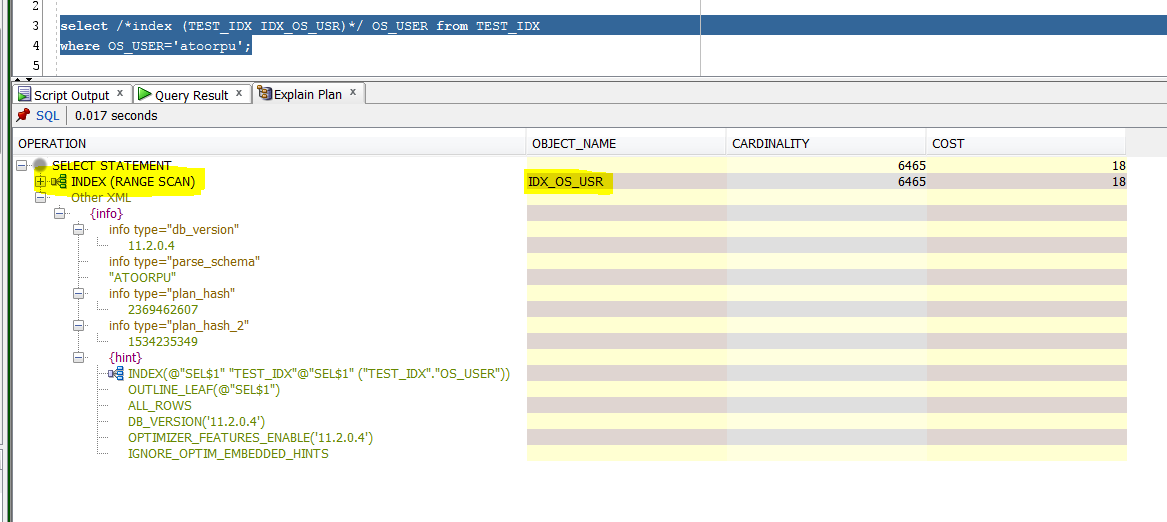
select /*+ index(TEST_IDX IDX_OS_USR) */ * from TEST_IDX;


If we alias the table (A in below case), you must use the alias in the index hint:

select /*+ index(A IDX_OS_USR) */ * from TEST_IDX A;

Note :

Oracle decides to use weather to use this hint or not, of oracle finds that it has faster execution plan without using hint it ignores it. You might think that an index may be helpfull and provide it as hint but oracle may still ignore it. In below case you can see hint being ignored.


Tuesday, June 7, 2016

CREATE INVISIBLE INDEX ON A TABLE

INVISIBLE INDEX:

Oracle 11g gives us ability to create indexes that can be marked as invisible. Invisible indexes are maintained like any other index, but they are ignored by the optimizer unless the OPTIMIZER_USE_INVISIBLE_INDEXES parameter is set to TRUE at the instance or session level

CREATE AN INVISIBLE INDEX:

CREATE INDEX INV_IDX_OS_USR ON TEST_IDX (ID) INVISIBLE;

lets check the newly created index :

SQL> select OWNER,INDEX_NAME,TABLE_OWNER,TABLE_NAME,VISIBILITY from all_indexes where index_name='INV_IDX_OS_USR';

OWNER         INDEX_NAME            TABLE_OWNER         TABLE_NAME      VISIBILITY       
--------      -----------                                    ----------               -----------                  --------
ATOORPU       INV_IDX_OS_USR       ATOORPU            TEST_IDX               INVISIBLE 


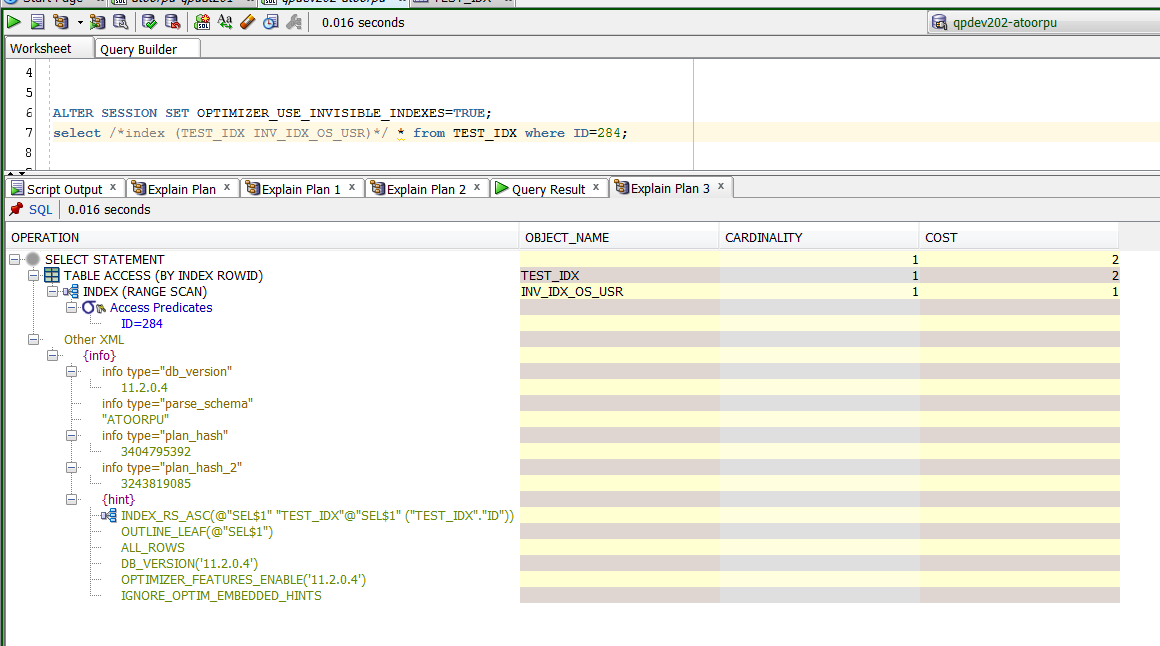
USER CAN'T MAKE USE OF INVISIBLE INDEX UNTIL HE MAKES IT VISIBLE IN THAT SESSION LETS SEE IF WE CAN USE INVISIBLE INDEX WITH OUT ENABLING IT IN OPTIMIZER:

select /*index (TEST_IDX INV_IDX_OS_USR)*/ * from TEST_IDX where ID=284;


MAKING AN INDEX VISIBLE IN CURRENT SESSION:

ALTER SESSION SET OPTIMIZER_USE_INVISIBLE_INDEXES=TRUE;
select /*index (TEST_IDX INV_IDX_OS_USR)*/ * from TEST_IDX where ID=284;


MAKING AN INDEX INVISIBLE IN CURRENT SESSION:

ALTER SESSION SET OPTIMIZER_USE_INVISIBLE_INDEXES=FALSE;

select /*index (TEST_IDX INV_IDX_OS_USR)*/ * from TEST_IDX where ID=284;

-->> you will not have to provide any hints to use index. I have provided hint just to make sure  oracle uses it.

select  * from TEST_IDX where ID=284;        -->> Same as above


MAKING AN INDEX INVISIBLE OR VISIBLE:


Indexes can be created as invisible by using the INVISIBLE keyword at the end, and their visibility can be managed using the ALTER INDEX command

TO MAKE AN EXISTING INDEX INVISIBLE USE BELOW SYNTAX: 

ALTER INDEX index_name INVISIBLE;

TO MAKE AN EXISTING INDEX VISIBLE USE BELOW SYNTAX: 


ALTER INDEX index_name VISIBLE;


Thursday, March 24, 2016

ORA-00837: Specified value of MEMORY_TARGET greater than MEMORY_MAX_TARGET

In this scenario I am trying to increase the value of parameter memory_max_target. My initial memory_max_target = 804 I want to increase it to 900

SQL> show parameter sga

NAME     TYPE VALUE
------------------------------------ ----------- ------------------------------
lock_sga     boolean FALSE
pre_page_sga     boolean FALSE
sga_max_size     big integer 804M
sga_target     big integer 0

SQL> show parameter max_target

NAME     TYPE VALUE
------------------------------------ ----------- ------------------------------
memory_max_target     big integer 804M

SQL> show parameter memory

NAME     TYPE VALUE
------------------------------------ ----------- ------------------------------
hi_shared_memory_address     integer 0
memory_max_target     big integer 804M
memory_target     big integer 804M
shared_memory_address     integer 0

SQL> alter system set memory_max_target=900 scope=spfile;

System altered.

SQL> show parameter memory;

NAME     TYPE VALUE
------------------------------------ ----------- ------------------------------
hi_shared_memory_address     integer 0
memory_max_target     big integer 804M
memory_target     big integer 804M
shared_memory_address     integer 0

SQL> shutdown immediate;
Database closed.
Database dismounted.
ORACLE instance shut down.

SQL> startup;
ORA-00837: Specified value of MEMORY_TARGET greater than MEMORY_MAX_TARGET
SQL> startup mount;
ORA-00837: Specified value of MEMORY_TARGET greater than MEMORY_MAX_TARGET
SQL> startup nomount;
ORA-00837: Specified value of MEMORY_TARGET greater than MEMORY_MAX_TARGET

Since we can't login into DB to check the value  that was set. Lets create pfile and check the actual value.

SQL> create pfile from spfile;

File created.

[oracle@Linux01 ~]$ cd $ORACLE_HOME/dbs

[oracle@Linux01 dbs]$ ls -ll

[oracle@Linux01 dbs]$ vi initDB11G.ora


Haha .. here is the problem in my case.


*********************************************************************************
In my case the problem is that, I didn't mention the MEMORY_MAX_TARGET in MB
Changing the value to MB did the trick
*********************************************************************************


[oracle@Linux01 dbs]$ sqlplus  /"AS sysdba"

SQL*Plus: Release 11.2.0.1.0 Production on Thu Mar 24 23:46:18 2016

Copyright (c) 1982, 2009, Oracle.  All rights reserved.

Connected to an idle instance.

Below reboot not needed but since I want to use spfile. I did it

SQL> startup pfile='$ORACLE_HOME/dbs/initDB11G.ora';
ORACLE instance started.

Total System Global Area  939495424 bytes
Fixed Size    2218952 bytes
Variable Size  675284024 bytes
Database Buffers  255852544 bytes
Redo Buffers    6139904 bytes
Database mounted.
Database opened.
SQL> create spfile from pfile;

File created.

SQL> shutdown immediate;
Database closed.
Database dismounted.
ORACLE instance shut down.
SQL> startup;
ORACLE instance started.

Total System Global Area  939495424 bytes
Fixed Size    2218952 bytes
Variable Size  675284024 bytes
Database Buffers  255852544 bytes
Redo Buffers    6139904 bytes
Database mounted.
Database opened.
SQL>


SQL> show parameter memory;

NAME     TYPE VALUE
------------------------------------ ----------- ------------------------------
hi_shared_memory_address     integer 0
memory_max_target     big integer 900M
memory_target     big integer 800M
shared_memory_address     integer 0


Monday, March 2, 2015

Automating Oracle ADDM Reports with PL/SQL: A Guide to Sending Performance Reports via Email

Blog Article Title: "Automating Oracle ADDM Reports with PL/SQL: A Guide to Sending Performance Reports via Email"

Article Description:

In this article, we will explore how to automate the process of generating and sending Oracle Automatic Database Diagnostic Monitor (ADDM) reports using PL/SQL. ADDM provides valuable insights into database performance, identifying potential issues and offering recommendations for tuning. By integrating PL/SQL with email functionalities, you can streamline the delivery of these performance reports directly to your inbox, making it easier to monitor and address database health. This guide will cover the components of a PL/SQL package designed for this purpose, with detailed explanations of each section, making it an essential resource for Oracle DBAs looking to enhance their monitoring capabilities.

Note: You can use either DBMS_Sceduler to set job inside the database or trigger through any shell script through the command prompt (sqlplus)

This is an awesome script that I found online blog post by 
Gokhan Atil (ORACLE ACE). I wanted to share this with my friends, as it will be very helpful in daily maintenance.


PLSQL for ADDM sent via EMAIL:

DECLARE
   dbid           NUMBER;
   bid            NUMBER;
   eid            NUMBER;
   db_unique_name VARCHAR2(30);
   host_name      VARCHAR2(64);
   status         VARCHAR2(11);
   starttime      CHAR (5);
   endtime        CHAR (5);
   output         VARCHAR2 (32000);
   v_from         VARCHAR2 (80);
   v_recipient    VARCHAR2 (80) := 'arvind@domain.com';
   v_mail_host    VARCHAR2 (30) := 'YOUR_SMTP_SERVER';
   v_mail_conn    UTL_SMTP.connection;
   tname varchar2(50);
   tid   number;
BEGIN
   starttime := '01:00';
   endtime := '12:00';

   SELECT MIN (snap_id), MAX (snap_id)
     INTO bid, eid
     FROM dba_hist_snapshot
    WHERE TO_CHAR (begin_interval_time, 'hh24:mi') >= starttime
      AND TO_CHAR (end_interval_time, 'hh24:mi') <= endtime
      AND TRUNC (begin_interval_time) = TRUNC (SYSDATE)
      AND TRUNC (end_interval_time) = TRUNC (SYSDATE);

   SELECT dbid, db_unique_name
     INTO dbid, db_unique_name
     FROM v$database;

   SELECT host_name INTO host_name
     FROM v$instance;
   
    DBMS_ADVISOR.CREATE_TASK('ADDM',tid,tname,'ADDM Report( '
    || bid || ',' || eid || ' )');
    DBMS_ADVISOR.SET_TASK_PARAMETER( tname,'START_SNAPSHOT',bid );
    DBMS_ADVISOR.SET_TASK_PARAMETER( tname,'END_SNAPSHOT',eid );
    DBMS_ADVISOR.EXECUTE_TASK( tname );  
   
    status := 0;
 
    while status <> 'COMPLETED' loop
    select status into status from dba_advisor_tasks where task_id = tid;
    dbms_lock.sleep(5);  
    end loop;

   v_from := db_unique_name ||  '@' || host_name;

   v_mail_conn := UTL_SMTP.OPEN_CONNECTION (v_mail_host, 25);
   UTL_SMTP.HELO (v_mail_conn, v_mail_host);
   UTL_SMTP.MAIL (v_mail_conn, v_from);
   UTL_SMTP.RCPT (v_mail_conn, v_recipient);
   UTL_SMTP.OPEN_DATA( v_mail_conn );
   UTL_SMTP.WRITE_DATA ( v_mail_conn, 'From:' || v_from || UTL_TCP.CRLF );
   UTL_SMTP.WRITE_DATA ( v_mail_conn, 'To:' || v_recipient || UTL_TCP.CRLF );
   UTL_SMTP.WRITE_DATA ( v_mail_conn, 'Subject: '
        || 'ADDM Report of ' || v_from || ' '
        || SYSDATE || ' ' || starttime || '-' || endtime
        || UTL_TCP.CRLF || UTL_TCP.CRLF );


   SELECT DBMS_ADVISOR.GET_TASK_REPORT( tname) INTO output FROM DUAL;
   UTL_SMTP.WRITE_DATA (v_mail_conn, output );
 
   UTL_SMTP.CLOSE_DATA (v_mail_conn);
   UTL_SMTP.QUIT (v_mail_conn);
 
EXCEPTION
   WHEN UTL_SMTP.TRANSIENT_ERROR OR UTL_SMTP.PERMANENT_ERROR
   THEN
      RAISE_APPLICATION_ERROR (-20000, 'Unable to send mail: ' || SQLERRM);
END;
/

Note : 

works only if you have set the SMTP server and ACL if you are working on Database 11G or higher


Extracted from :

http://www.gokhanatil.com/2011/07/create-awr-and-addm-reports-and-send-them-via-email.html

Plsql Package to receive an Oracle Database AWR Report sent to EMAIL

In this article, we delve into the practical implementation of using a PL/SQL package to automate the generation and distribution of Oracle Database Automatic Workload Repository (AWR) reports via email. AWR reports are essential tools for database administrators, providing in-depth performance metrics and insights that help in diagnosing issues, optimizing queries, and improving overall database performance. Manually generating these reports and sharing them with stakeholders can be time-consuming and prone to delays.

To streamline this process, we demonstrate how to create a PL/SQL package that automates the generation of AWR reports and sends them directly to your inbox or other designated recipients. We will cover the package setup, key PL/SQL procedures, and how to configure the email functionality using Oracle’s UTL_MAIL or UTL_SMTP package. This solution not only saves time but also ensures that critical performance data is consistently monitored and shared with the right team members.

By the end of this article, you will have a ready-to-use script that simplifies AWR report distribution, enhancing your ability to maintain optimal database performance with minimal manual intervention. Whether you are a seasoned DBA or new to Oracle performance tuning, this guide will help you automate a critical aspect of your database management workflow.


This is an awesome script that I found online blog post by Gokhan Atil (ORACLE ACE).I wanted to share this with my friends, as it will be very helpful in daily maintenance.

PLSQL to send the AWR report to your email directly.


DECLARE
   dbid           NUMBER;
   inst_id        NUMBER;
   bid            NUMBER;
   eid            NUMBER;
   db_unique_name VARCHAR2(30);
   host_name       VARCHAR2(64);
   starttime      CHAR (5);
   endtime        CHAR (5);
   v_from         VARCHAR2 (80);
   v_recipient    VARCHAR2 (80) := 'arvind@domain.com';
   v_mail_host    VARCHAR2 (30) := 'YOUR_SMTP_SERVER';
   v_mail_conn    UTL_SMTP.connection;
BEGIN
   starttime := '06:00';
   endtime := '10:00';

   SELECT MIN (snap_id), MAX (snap_id)
     INTO bid, eid
     FROM dba_hist_snapshot
    WHERE TO_CHAR (begin_interval_time, 'hh24:mi') >= starttime
      AND TO_CHAR (end_interval_time, 'hh24:mi') <= endtime
      AND TRUNC (begin_interval_time) = TRUNC (SYSDATE)
      AND TRUNC (end_interval_time) = TRUNC (SYSDATE);

   SELECT dbid, inst_id, db_unique_name
     INTO dbid, inst_id, db_unique_name
     FROM gv$database;

   SELECT host_name INTO host_name
     FROM v$instance;

   v_from := db_unique_name ||  '@' || host_name;

   v_mail_conn := UTL_SMTP.OPEN_CONNECTION (v_mail_host, 25);
   UTL_SMTP.HELO (v_mail_conn, v_mail_host);
   UTL_SMTP.MAIL (v_mail_conn, v_from);
   UTL_SMTP.RCPT (v_mail_conn, v_recipient);
   UTL_SMTP.OPEN_DATA( v_mail_conn );
   UTL_SMTP.WRITE_DATA ( v_mail_conn, 'From:' || v_from || UTL_TCP.CRLF );
   UTL_SMTP.WRITE_DATA ( v_mail_conn, 'To:' || v_recipient || UTL_TCP.CRLF );
   UTL_SMTP.WRITE_DATA ( v_mail_conn, 'Subject: '
        || 'AWR Report of ' || v_from || ' '
        || SYSDATE || ' ' || starttime || '-' || endtime || UTL_TCP.CRLF  );
   UTL_SMTP.WRITE_DATA ( v_mail_conn,
        'Content-Type: text/html; charset=utf8'
        || UTL_TCP.CRLF || UTL_TCP.CRLF );  

   FOR c1_rec IN
      (SELECT output
         FROM TABLE (DBMS_WORKLOAD_REPOSITORY.AWR_REPORT_HTML(dbid,
           inst_id, bid, eid, 8 )))
   LOOP
      UTL_SMTP.WRITE_DATA (v_mail_conn, c1_rec.output || UTL_TCP.CRLF );
   END LOOP;
 
   UTL_SMTP.CLOSE_DATA (v_mail_conn);
   UTL_SMTP.QUIT (v_mail_conn);
 
EXCEPTION
   WHEN UTL_SMTP.TRANSIENT_ERROR OR UTL_SMTP.PERMANENT_ERROR
   THEN
      RAISE_APPLICATION_ERROR (-20000, 'Unable to send mail: ' || SQLERRM);
END;


Note : 

works only if you have set the SMTP server and ACL if you are working on Database 11G or higher


Extracted from :

http://www.gokhanatil.com/2011/07/create-awr-and-addm-reports-and-send-them-via-email.html

Thursday, August 21, 2014

Oracle Shrink Table - regain your space back

I believe this is better explained with an example.

Sql code:

lets first check if your database table spaces that re in manual and auto segment space management.

 SELECT tablespace_name, extent_management, segment_space_management
    FROM dba_tablespaces;

  
    TABLESPACE_NAME                EXTENT_MANAGEMENT SEGMENT_SPACE_MANAGEMENT
------------------------------ ----------------- ------------------------
SYSTEM                         LOCAL             MANUAL                 
SYSAUX                         LOCAL             AUTO                   
UNDOTBS1                       LOCAL             MANUAL                 
TEMP                           LOCAL             MANUAL                 
USERS                          LOCAL             AUTO                   


SQL> create table test ( x number )
  2  tablespace users
  3  storage ( initial 10M next 10M )
  4  /

Table created.

SQL> analyze table t compute statistics;

Table analyzed.

SQL> select blocks, extents from user_segments where segment_name = 'TEST';

    BLOCKS    EXTENTS
---------- ----------
      1280         10

SQL> select blocks, empty_blocks from user_tables where table_name = 'TEST';

    BLOCKS EMPTY_BLOCKS
---------- ------------
         0         1280

So, I started creating a table named TEST and requested initially 10mb allocated, which turned out to be 1280 blocks and 10 extents. From there you can see:
- table TEST has 1280 blocks allocated (blocks in user_segment)
- none of which are *formatted* to receive data (blocks in user_tables)

Then, I insert some data
sql code:

SQL> insert into TEST
    select rownum
     from dual
   connect by level <= 100000;

100000 rows created.

SQL> analyze table TEST compute statistics;

Table analyzed.

SQL> select blocks, extents from user_segments where segment_name = 'TEST';

    BLOCKS    EXTENTS
---------- ----------
      1280         10

SQL> select blocks, empty_blocks from user_tables where table_name = 'TEST';

    BLOCKS EMPTY_BLOCKS
---------- ------------
       186         1094

I inserted 100,000 rows, from there you can see:
- allocated blocks/extents for the table did not change
- however, blocks formated to receive data were raised by 186 and the remaining blocks are empty

186 blocks are the HWM now, because those are the blocks that sometime were formatted to receive data. Blocks above 186 are allocated blocks which have never been formatted to receive data.

I will delete some data now to show you it will not raise empty_blocks nor it will lower the blocks that are formatted to receive data (that is, the HWM).
sql code:

SQL> delete from TEST where rownum <= 90000;

90000 rows deleted.

SQL> analyze table TEST compute statistics;

Table analyzed.

SQL> select blocks, empty_blocks from user_tables where table_name = 'TEST';

    BLOCKS EMPTY_BLOCKS
---------- ------------
       186         1094

See, the delete did nothing to change the HWM, but.. that is because HWM is never reset back when you delete the rows (in oracle)
sql code:

SQL> select count(distinct dbms_rowid.rowid_block_number(rowid)) used_blocks from TEST;

USED_BLOCKS
-----------
         16

tells me only 16 of those 186 contains data. The rest blocks belong to the segment's freelist to be used for inserts/updates.

Now, I will *move* the table to show you how it will re-adjust the HWM.
sql code:

SQL> alter table TEST move tablespace users;

Table altered.

SQL> analyze table TEST compute statistics;

Table analyzed.

SQL> select blocks, empty_blocks from user_tables where table_name = 'TEST';

    BLOCKS EMPTY_BLOCKS
---------- ------------
        20         1260

See, it shrinked down the HWM to just 20 from 186 and raised the empty_blocks, but..
sql code:

SQL> select blocks, extents from user_segments where segment_name = 'TEST';

    BLOCKS    EXTENTS
---------- ----------
      1280         10

tells you it did nothing to *shrink* the allocated space asigned to the segment, meaning that at this stage the segment will still be using,
at the operating system level space, the same kind of storage. Now, to *reclaim* that space we will use shrink.
sql code:


SQL> alter table TEST enable row movement;

Table altered.

sql > alter table TEST shrink space compact;

Table altered.

SQL> alter table TEST shrink space;

Table altered.

SQL> analyze table TEST compute statistics;

Table analyzed.

SQL> select blocks, extents from user_segments where segment_name = 'TEST';

    BLOCKS    EXTENTS
---------- ----------
       128          1

SQL> select blocks, empty_blocks from user_tables where table_name = 'TEST';

    BLOCKS EMPTY_BLOCKS
---------- ------------
        20          108