If you are trying to install the RAC, then you might come up across a missing cvuqdisk* rpm error.This package comes with the Grid install software.Once you have downloaded the Grid infrastructure software. You will find the Cvuqdisk* package in the rpm directory.
grid@RAC01:[/u01/app/ORCL_SFTW/grid_software] $ ls
install readme.html response rpm runcluvfy.sh runInstaller sshsetup stage welcome.html
Now change dir to rpm :
grid@RAC01:[/u01/app/ORCL_SFTW/grid_software] $ cd rpm
grid@RAC01:[/u01/app/ORCL_SFTW/grid_software/rpm] $ exit
logout
atoorpu@RAC01:[/u01/app] $ cd /u01/app/ORCL_SFTW/grid_software/rpm
You need to be logged in as root to install the package.
atoorpu@RAC01:[/u01/app/ORCL_SFTW/grid_software/rpm] $ sudo rpm -Uvh cvuqdisk-1.0.9-1.rpm
Preparing... ########################################### [100%]
1:cvuqdisk ########################################### [100%]
NOTE : Now lets see if the package was installed or not. Check this on both servers.
atoorpu@RAC01:[/u01/app/ORCL_SFTW/grid_software/rpm] $ rpm -qa |grep cvuqdisk-1.0*
cvuqdisk-1.0.9-1.x86_64
Showing posts with label RAC. Show all posts
Showing posts with label RAC. Show all posts
Monday, January 18, 2016

Wednesday, September 16, 2015
[PRCF-2010 : All connections to the remote nodes got refused. Cannot proceed with the file transfer. There has to be at least one remote node to send the installer files!
I was trying to setup Oracle RAC on my local machine and grid installation worked fine untill 65-70% and I got this weird error. After researching many blogs and sites. I was able to overcome that error and succesfully install the Grid Infrastructure.
[PRCF-2010 : All connections to the remote nodes got refused. Cannot proceed with the file transfer. There has to be at least one remote node to send the installer files!
I have some issues with the instalation of the 11G R2 Grid...
Passed all the prereq checks, everything working but when reaching the - Performing Remote Operations stage it freezes.
Checked the errors and when reaching that stage an error is dumped in the oraInstall.err file:
Exception in thread "Install API Thread" java.lang.NullPointerException
at oracle.cluster.deployment.ractrans.ClientHandlerSupervisor.threadCleanup(ClientHandlerSupervisor.java:926)
at oracle.cluster.deployment.ractrans.RACTransfer.cleanup(RACTransfer.java:1749)
at oracle.cluster.deployment.ractrans.RACTransfer.transferDirStructureToNodes(RACTransfer.java:746)
at oracle.cluster.deployment.ractrans.RACTransfer.transferDirToNodes(RACTransfer.java:252)
at oracle.ops.mgmt.cluster.ClusterCmd.transferDirToNodes(ClusterCmd.java:3103)
at oracle.ops.mgmt.cluster.ClusterCmd.transferDirToNodes(ClusterCmd.java:3022)
at oracle.sysman.oii.oiip.oiipg.OiipgClusterOps.transferDirToNodes(OiipgClusterOps.java:947)
at oracle.sysman.oii.oiif.oiifw.OiifwClusterCopyWCCE.doOperation(OiifwClusterCopyWCCE.java:544)
at oracle.sysman.oii.oiif.oiifb.OiifbCondIterator.iterate(OiifbCondIterator.java:171)
at oracle.sysman.oii.oiif.oiifw.OiifwActionsPhaseWCDE.doOperation(OiifwActionsPhaseWCDE.java:633)
at oracle.sysman.oii.oiif.oiifb.OiifbLinearIterator.iterate(OiifbLinearIterator.java:147)
at oracle.sysman.oii.oiic.OiicInstallAPISession$OiicAPISelCompsInstall.doOperation(OiicInstallAPISession.java:1058)
at oracle.sysman.oii.oiif.oiifb.OiifbCondIterator.iterate(OiifbCondIterator.java:171)
at oracle.sysman.oii.oiic.OiicInstallAPISession.doInstallAction(OiicInstallAPISession.java:642)
at oracle.sysman.oii.oiic.OiicInstallAPISession.access$000(OiicInstallAPISession.java:88)
at oracle.sysman.oii.oiic.OiicInstallAPISession$OiicActionsThread.run(OiicInstallAPISession.java:934)
In the installActions.log file the last lines are:
INFO: ORACLE_HOME is not settable, hence not setting the value
INFO: {Parameter:TOPLEVEL_COMPONENT in {Aggregate:OuiConfigVariables:1.0.0.0.0:common}}: Parameter data type is not compatible with the provided String Array.
INFO: passing params to cf done
INFO: done saving info by cf
INFO: Updating files in Oracle home '/u01/app/11.2.0/grid' to remote nodes 'oradb2'.
INFO: InstallProgressMonitor: Starting phase 16
INFO: List of files to be excluded from:install/excludeFileList.txt
INFO: Updating files in Oracle home '/u01/app/11.2.0/grid' to remote nodes 'oradb2'.
INFO: Updating files in Oracle home '/u01/app/11.2.0/grid' to remote nodes 'oradb2'.
INFO: Running command '/tmp/OraInstall2009-12-14_01-12-56AM/mvstubs.sh' on the nodes 'oradb2'.
INFO: Invoking OUI on cluster nodes oradb2
INFO: /tmp/OraInstall2009-12-14_01-12-56AM/mvstubs.sh
INFO: Copying Oracle home '/u01/app/11.2.0/grid' to remote nodes 'oradb2'.
INFO: Copying Oracle home '/u01/app/11.2.0/grid' to remote nodes 'oradb2'.
Solution that worked for me (I think it will work for you people to..) :
This happens basically for various reasons:
1. If both the servers are unable to contact each other due to firewall issues. In order to over this error u have to disable for firewall between both servers. You can do this going to system >> administration >>firewall >> disable.
2.The workaround was to stop the firewall on both nodes using "service iptables stop" during installation - this seems to resolve the issue.
3. make sure SELINUX is disabled.
4.Make sure your ssh connectivity is working fine between servers
I found this page very interesting about Multicast :
http://blog.trivadis.com/b/robertbialek/archive/2011/10/07/grid-infrastructure-11-2-0-3-and-multicasting.aspx
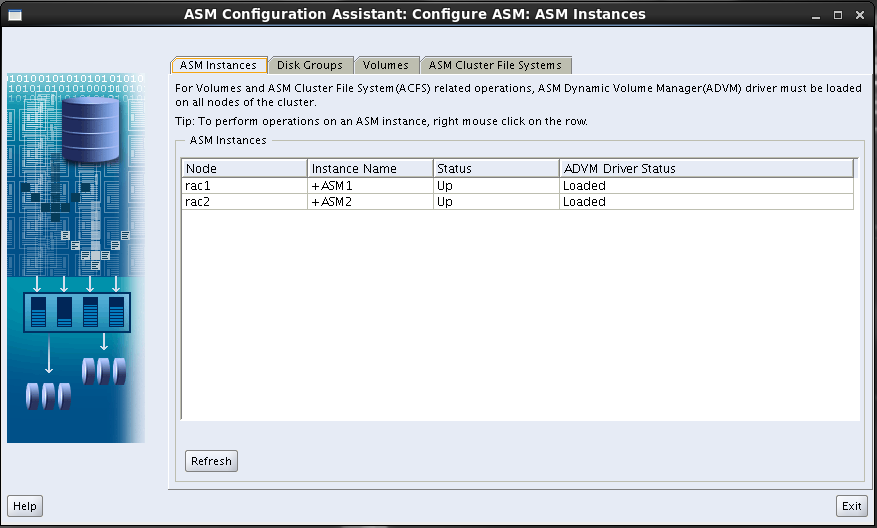
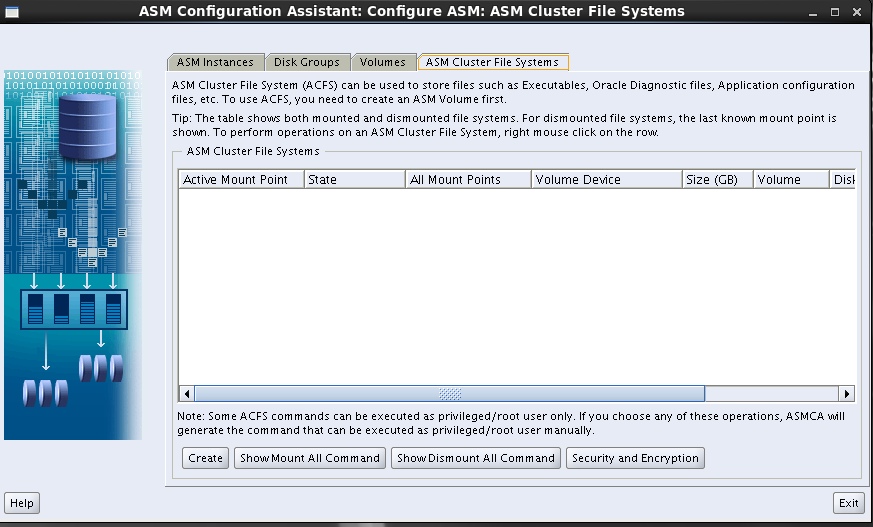
Adding disk group to ASM instance using ASMCA
Here is the step by step process on how to add diskgroup to existing ASM instance via ASMCA.
on cmd prompt set the ASM insatance and then invoke asmca. by using below cmd.
$ asmca


Thursday, July 23, 2015
PRVF-7532 : Package "libaio-0.3.105 (i386)" is missing - Oracle installation requires old rpm versions, what to do?
Below packages can usually be ignored as oracle installer thinks they are not available and are still needed while they already exists.

[root@rac2 Desktop]# yum install libaio-0.3.105-2.i386.rpm
Loaded plugins: refresh-packagekit, security
Setting up Install Process
No package libaio-0.3.105-2.i386.rpm available.
Error: Nothing to do
[root@rac2 Desktop]# rpm -ivh compat-libstdc++*
error: File not found by glob: compat-libstdc++*
[root@rac2 Desktop]# ps -ef |grep compat-libstdc++*
root 11837 7817 0 19:27 pts/0 00:00:00 grep compat-libstdc++*
[root@rac2 Desktop]# rpm -qa|grep compat-libstdc++*
compat-libstdc++-296-2.96-144.el6.i686
compat-libstdc++-33-3.2.3-69.el6.x86_64
Reference :
You can also see below notes from this link:
Installing Oracle Software
Install Oracle software without clicking through Oracle Universal Installer (OUI). Use instead smart swInst action of install Manager which installs Oracle SW with OUI silently. Add your own response files if you prefer another ORACLE_HOME destination.
$ bash
$ cd $INSTALL_CONF
$ cp sample/swInstEeSrv1-linux-x86_64.cfg .
$ installManager swInst swInstEeSrv1-linux-x86_64.cfg
$ su -
# /opt/oracle/eesrv/11.2.0/db1/root.sh
# exit
Oracle Universal Installer prints beginning with 11g R2 also warnings for optional requirements. Identify the errors and decide whether they can be ignored or not. The next example shows errors which can usually be ignored since OUI does not recognize newer packages.
20101205_185530: Info: Grepping for PRVF- pattern in /opt/oracle/oraInventory/logs/installActions2010-12-05_06-40-15PM.log
INFO: Error Message:PRVF-7532 : Package "libaio-0.3.105 (i386)" is missing on node "<node_name>"
INFO: Error Message:PRVF-7532 : Package "compat-libstdc++-33-3.2.3 (i386)" is missing on node "<node_name>"
INFO: Error Message:PRVF-7532 : Package "libaio-devel-0.3.105 (i386)" is missing on node "<node_name>"
INFO: Error Message:PRVF-7532 : Package "libgcc-3.4.6 (i386)" is missing on node "<node_name>"
INFO: Error Message:PRVF-7532 : Package "libstdc++-3.4.6 (i386)" is missing on node "<node_name>"
INFO: Error Message:PRVF-7532 : Package "unixODBC-2.2.11 (i386)" is missing on node "<node_name>"
INFO: Error Message:PRVF-7532 : Package "unixODBC-devel-2.2.11 (i386)" is missing on node "<node_name>"
INFO: Error Message:PRVF-7532 : Package "pdksh-5.2.14" is missing on node "<node_name>"
Wednesday, June 24, 2015
create shared disks (vdi) on Virtualbox for ASM - vboxmanage command line
vboxmanage command line
For our scenario :
Lets create shared disks (vdi) on Virtualbox for ASM setup.
If you are getting error like below make sure you have virtual-box set in your environmental path:

In my case I have to add "C:\Program Files\Oracle\VirtualBox\" to my path. To add it to your environmental path goto :
Startup >> computer (right click) >> properties >> advanced system settings >> environmental variables >>

Add your virtual box installed path, usually c\programe files \ oracle
Now test the vboxmanage cmd :
You will get something like this if you have any virtual machines created.
Microsoft Windows [Version 6.1.7601]
Copyright (c) 2009 Microsoft Corporation. All rights reserved.
C:\Users\arvind>vboxmanage list vms
"linux1" {69b544d2-bf64-4f83-a525-a7f2dd2007e7}
Now lets create a shared asm drive for ASM :
Note : Always pick a different location, but make sure they are outside the existing VM directory.
$ mkdir C:/VirtualBox/
$ cd C:/VirtualBox/
$
$ # Create the disks and associate them with VirtualBox as virtual media.
VBoxManage createhd --filename asm1.vdi --size 5120 --format VDI --variant Fixed
C:\Virtualdisks>VBoxManage createhd --filename asm1.vdi --size 5120 --format VDI
--variant Fixed
0%...10%...20%...30%...40%...50%...60%...70%...80%...90%...100%
Disk image created. UUID: c8a5ef46-7304-4ea0-b685-e1efbf6ab41e
$ # Connect them to the VM.
VBoxManage storageattach linux1 --storagectl "SATA" --port 1 --device 0 --type hdd --medium asm1.vdi --mtype shareable
$ # Make shareable.
$ VBoxManage modifyhd asm1.vdi --type shareable
We now have shared disks added to Virtual box.

We can also add these shared disks via Graphical interface :
See below for instructions:
Step 1 :
Select >> add hard disks >>

Step 2:
select vdi

Step 3
select fixed size

Step 4
it will be added now.

Step 5
select (virtual box top left) File >> virtual Media manager >> select disk you want to modify >> right click >> click modify

Step 6
Select modify and close.

Note :
If you are going to use this for RAC setup. make sure you attach this shared disks to both of your environments.
For our scenario :
Lets create shared disks (vdi) on Virtualbox for ASM setup.
If you are getting error like below make sure you have virtual-box set in your environmental path:

In my case I have to add "C:\Program Files\Oracle\VirtualBox\" to my path. To add it to your environmental path goto :
Startup >> computer (right click) >> properties >> advanced system settings >> environmental variables >>
- Click on start
- Right click on Computer
- Click Properties
- Click Advanced system settings
- Click Environment Variables
- Go to system variables
- find Path and edit it
- add your file location at the end of the box.

Add your virtual box installed path, usually c\programe files \ oracle
Now test the vboxmanage cmd :
You will get something like this if you have any virtual machines created.
Microsoft Windows [Version 6.1.7601]
Copyright (c) 2009 Microsoft Corporation. All rights reserved.
C:\Users\arvind>vboxmanage list vms
"linux1" {69b544d2-bf64-4f83-a525-a7f2dd2007e7}
Now lets create a shared asm drive for ASM :
Note : Always pick a different location, but make sure they are outside the existing VM directory.
$ mkdir C:/VirtualBox/
$ cd C:/VirtualBox/
$
$ # Create the disks and associate them with VirtualBox as virtual media.
VBoxManage createhd --filename asm1.vdi --size 5120 --format VDI --variant Fixed
C:\Virtualdisks>VBoxManage createhd --filename asm1.vdi --size 5120 --format VDI
--variant Fixed
0%...10%...20%...30%...40%...50%...60%...70%...80%...90%...100%
Disk image created. UUID: c8a5ef46-7304-4ea0-b685-e1efbf6ab41e
$ # Connect them to the VM.
VBoxManage storageattach linux1 --storagectl "SATA" --port 1 --device 0 --type hdd --medium asm1.vdi --mtype shareable
$ # Make shareable.
$ VBoxManage modifyhd asm1.vdi --type shareable
We now have shared disks added to Virtual box.

We can also add these shared disks via Graphical interface :
See below for instructions:
Step 1 :
Select >> add hard disks >>

Step 2:
select vdi

Step 3
select fixed size

Step 4
it will be added now.

Step 5
select (virtual box top left) File >> virtual Media manager >> select disk you want to modify >> right click >> click modify

Step 6
Select modify and close.

Note :
If you are going to use this for RAC setup. make sure you attach this shared disks to both of your environments.
Subscribe to:
Posts
(
Atom
)