Showing posts with label listener. Show all posts

Tuesday, July 12, 2016

TNS-00583: Valid node checking: unable to parse configuration parameters

 TNS-12560: TNS:protocol adapter error  TNS-00583: Valid node checking: unable to parse configuration parameters

I  Received following errors when trying to startup my listener. I verified the listener.ora and sqlnet.ora files and everything seemed to look normal.
 
[oracle@Linux03 encryption_keystore]$ lsnrctl start

LSNRCTL for Linux: Version 12.1.0.2.0 - Production on 12-JUL-2016 10:05:32

Copyright (c) 1991, 2014, Oracle.  All rights reserved.

Starting /u01/app/oracle/product/12.1.0.2/db_1/bin/tnslsnr: please wait...

TNSLSNR for Linux: Version 12.1.0.2.0 - Production
System parameter file is /u01/app/oracle/product/12.1.0.2/db_1/network/admin/listener.ora
Log messages written to /u01/app/oracle/diag/tnslsnr/Linux03/listener/alert/log.xml
Listening on: (DESCRIPTION=(ADDRESS=(PROTOCOL=ipc)(KEY=EXTPROC1)))
Error listening on: (DESCRIPTION=(ADDRESS=(PROTOCOL=TCP)(HOST=Linux03)(PORT=1521)))
TNS-12560: TNS:protocol adapter error
 TNS-00583: Valid node checking: unable to parse configuration parameters


Listener failed to start. See the error message(s) above...

[oracle@Linux03 encryption_keystore]$ lsnrctl start

LSNRCTL for Linux: Version 12.1.0.2.0 - Production on 12-JUL-2016 10:07:41

Copyright (c) 1991, 2014, Oracle.  All rights reserved.

Starting /u01/app/oracle/product/12.1.0.2/db_1/bin/tnslsnr: please wait...

TNSLSNR for Linux: Version 12.1.0.2.0 - Production
System parameter file is /u01/app/oracle/product/12.1.0.2/db_1/network/admin/listener.ora
Log messages written to /u01/app/oracle/diag/tnslsnr/Linux03/listener/alert/log.xml
Error listening on: (DESCRIPTION=(ADDRESS=(PROTOCOL=TCP)(HOST=Linux03)(PORT=1521)))
TNS-12560: TNS:protocol adapter error
 TNS-00583: Valid node checking: unable to parse configuration parameters


Listener failed to start. See the error message(s) above...


I had below line in my sqlnet.ora file.

[oracle@Linux03 admin]$ cat sqlnet.ora_bak
# sqlnet.ora Network Configuration File: /u01/app/oracle/product/12.1.0.2/db_1/network/admin/sqlnet.ora
# Generated by Oracle configuration tools.

NAMES.DIRECTORY_PATH= (TNSNAMES, EZCONNECT)

ENCRYPTION_WALLET_LOCATION =
  (SOURCE =(METHOD = FILE)(METHOD_DATA =
    (DIRECTORY = /u01/app/oracle/admin/$ORACLE_SID/encryption_keystore/)  
  

Solution (In my case):

1. Tried to remove the ENCRYPTION_WALLET_LOCATION info and it worked for me. I knew there was somthing wrong with the syntax.
2. Copied the content from ENCRYPTION_WALLET* into notepad ++ . It helped me realize that I was missing two closing parenthesis )) at end.
3. Added them at end. Started the listener and worked.


[oracle@Linux03 encryption_keystore]$ lsnrctl start

LSNRCTL for Linux: Version 12.1.0.2.0 - Production on 12-JUL-2016 10:31:41

Copyright (c) 1991, 2014, Oracle.  All rights reserved.

Starting /u01/app/oracle/product/12.1.0.2/db_1/bin/tnslsnr: please wait...

TNSLSNR for Linux: Version 12.1.0.2.0 - Production
System parameter file is /u01/app/oracle/product/12.1.0.2/db_1/network/admin/listener.ora
Log messages written to /u01/app/oracle/diag/tnslsnr/Linux03/listener/alert/log.xml
Listening on: (DESCRIPTION=(ADDRESS=(PROTOCOL=tcp)(HOST=Linux03)(PORT=1521)))
Listening on: (DESCRIPTION=(ADDRESS=(PROTOCOL=ipc)(KEY=EXTPROC1521)))

Connecting to (DESCRIPTION=(ADDRESS=(PROTOCOL=TCP)(HOST=Linux03)(PORT=1521)))
STATUS of the LISTENER
------------------------
Alias                     LISTENER
Version                   TNSLSNR for Linux: Version 12.1.0.2.0 - Production
Start Date                12-JUL-2016 10:31:41
Uptime                    0 days 0 hr. 0 min. 0 sec
Trace Level               off
Security                  ON: Local OS Authentication
SNMP                      OFF
Listener Parameter File   /u01/app/oracle/product/12.1.0.2/db_1/network/admin/listener.ora
Listener Log File         /u01/app/oracle/diag/tnslsnr/Linux03/listener/alert/log.xml
Listening Endpoints Summary...
  (DESCRIPTION=(ADDRESS=(PROTOCOL=tcp)(HOST=Linux03)(PORT=1521)))
  (DESCRIPTION=(ADDRESS=(PROTOCOL=ipc)(KEY=EXTPROC1521)))
The listener supports no services
The command completed successfully


Also try these if above trick doesn't help.

1.  Oracle listener.ora or sqlnet.ora file contains any special characters.
2.  Oracle Listener.ora or sqlnet.ora file are in wrong format or syntax.
3.  Oracle listener.ora or sqlnet.ora file have some left justified parenthesis which are not accepted by oracle parser.

Wednesday, September 16, 2015

How To Change the Listener Log Filename Without Stopping the Listener

At the LSNRCTL prompt:

$ lsnrctl

LSNRCTL> set current_listener LISTENER 


Current Listener is LISTENER
LSNRCTL> set log_file /u01/app/oracle/diag/tnslsnr/linux01/listener/trace/listener1.log
Connecting to (DESCRIPTION=(ADDRESS=(PROTOCOL=TCP)(HOST=linux01)(PORT=1521)))
LISTENER parameter "log_file" set to /u01/app/oracle/diag/tnslsnr/linux01/listener/trace/listener1.log
The command completed successfully


LSNRCTL> save_config


Connecting to (DESCRIPTION=(ADDRESS=(PROTOCOL=TCP)(HOST=linux01)(PORT=1521)))
Saved LISTENER configuration parameters.
Listener Parameter File   /u01/app/oracle/product/11.2/db_1/network/admin/listener.ora
Old Parameter File   /u01/app/oracle/product/11.2/db_1/network/admin/listener.bak
The command completed successfully


LSNRCTL> exit


Note : If you get this error "TNS-01251: Cannot set trace/log directory under ADR" refer to below link

click on this >> TNS-01251


TNS-01251: Cannot set trace/log directory under ADR


[oracle@linux01 trace]$ lsnrctl

LSNRCTL for Linux: Version 11.2.0.1.0 - Production on 16-SEP-2015 11:24:18

Copyright (c) 1991, 2009, Oracle.  All rights reserved.

Welcome to LSNRCTL, type "help" for information.

LSNRCTL> set current_listener LISTENER
Current Listener is LISTENER

LSNRCTL> set log_file listener1
Connecting to (DESCRIPTION=(ADDRESS=(PROTOCOL=TCP)(HOST=linux01)(PORT=1521)))
TNS-01251: Cannot set trace/log directory under ADR 


Solution :


DIAG_ADR_ENABLED_LISTENER=OFF     -- >> add this line to you listener.ora


reload the listener.

$ lsnrctl reload 

Now lets try again to reset:

LSNRCTL> set current_listener LISTENER
Current Listener is LISTENER

LSNRCTL> set log_file /u01/app/oracle/diag/tnslsnr/linux01/listener/trace/listener1.log
Connecting to (DESCRIPTION=(ADDRESS=(PROTOCOL=TCP)(HOST=linux01)(PORT=1521)))
LISTENER parameter "log_file" set to /u01/app/oracle/diag/tnslsnr/linux01/listener/trace/listener1.log
The command completed successfully

LSNRCTL> save_config
Connecting to (DESCRIPTION=(ADDRESS=(PROTOCOL=TCP)(HOST=linux01)(PORT=1521)))
Saved LISTENER configuration parameters.
Listener Parameter File   /u01/app/oracle/product/11.2/db_1/network/admin/listener.ora
Old Parameter File   /u01/app/oracle/product/11.2/db_1/network/admin/listener.bak
The command completed successfully

Tuesday, September 15, 2015

information provided for listener is currently in use by another software - Virtualbox


I know this is a common problem that I have come across many time, while installing oracle software on Virtual machine  >>  Linux (Guest OS). I thought of sharing this info as this might help others to ..

Problem / Error :

I was trying to install oracle software on virtual box. I keep getting this error information provided for listener is currently in use by another software.

(or) 

Port you have provided xxxx (1523) is being used by another program.


Solution : 

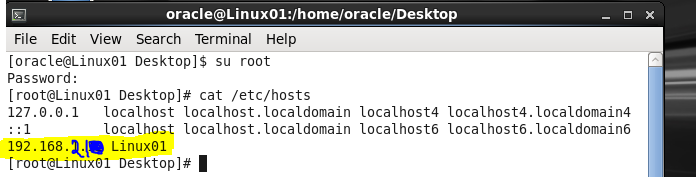
Step 1 : Make sure you login as Root user.
Step 2 : make sure your valid ip address  in   >>    /etc/hosts
Step 3 : Make sure no other program is using listener port   >> netstat -ntap | grep 1521


In my case initially it had wrong ip address in the /etc/hosts  file.


Thursday, June 25, 2015

CREATE ORACLE DATABASE SERVICE

dbms_service.create_service :  

We can call dbms_service.create_service procedure to create new service names , then start these service names for user connections. The procedure dbms_service.create_service requires the service name and service network name, use the service name to manage the service name.


oracle@LINUX201:[~] $ sqlplus /"As sysdba"

SQL*Plus: Release 11.2.0.4.0 Production on Tue Apr 5 13:17:50 2016

Copyright (c) 1982, 2013, Oracle.  All rights reserved.


Connected to:
Oracle Database 11g Enterprise Edition Release 11.2.0.4.0 - 64bit Production
With the Partitioning, OLAP, Data Mining and Real Application Testing options

SQL> select SERVICE_ID,name from V$SERVICES;

SERVICE_ID NAME
---------- ----------------------------------------------------------------
         4 ORCL
         1 SYS$BACKGROUND
         2 SYS$USERS

************************************************************

LEST CREATE A NEW DB SERVICE 

************************************************************


SAMPLE :

BEGIN

DBMS_SERVICE.CREATE_SERVICE(service_name=>'QPDEV',

 network_name=>'QPDEV.WORLD'); (or)  network_name=>'QPDEV');

 END;

 /


SQL> begin
 dbms_service.create_service('ORCLTEST','ORCLTEST');
end;
/

PL/SQL procedure successfully completed.

SQL> select SERVICE_ID,name from V$SERVICES;

SERVICE_ID NAME
---------- ----------------------------------------------------------------
         4 ORCL
         1 SYS$BACKGROUND
         2 SYS$USERS

SQL> begin
 DBMS_SERVICE.START_SERVICE('ORCL');
end;
/  2    3    4

PL/SQL procedure successfully completed.

************************************************************

CHECK IF THE SERVICE IS CREATED AND STARTED

************************************************************


SQL> select SERVICE_ID,name from V$SERVICES;

SERVICE_ID NAME
---------- ----------------------------------------------------------------
         7 ORCLTEST
         4 ORCL
         1 SYS$BACKGROUND
         2 SYS$USERS

SQL> exit
Disconnected from Oracle Database 11g Enterprise Edition Release 11.2.0.4.0 - 64bit Production
With the Partitioning, OLAP, Data Mining and Real Application Testing options

oracle@LINUX201:[~] $ cd $ORACLE_HOME/network/admin

oracle@LINUX201:[/u01/app/oracle/product/11.2.0/db_1/network/admin] $ ls
samples  shrept.lst  tnsnames.ora

************************************************************

LETS ADD THIS NEW SERVICE IN TO TNSNAMES FILE:

************************************************************


oracle@LINUX201:[/u01/app/oracle/product/11.2.0/db_1/network/admin] $ vi tnsnames.ora
# tnsnames.ora Network Configuration File: /u01/app/oracle/product/11.2/db_1/network/admin/tnsnames.ora
# Generated by Oracle configuration tools.

ORCL =
  (DESCRIPTION =
    (ADDRESS = (PROTOCOL = TCP)(HOST = LINUX201.world.com)(PORT = 1521))
    (CONNECT_DATA =
      (SERVER = DEDICATED)
      (SERVICE_NAME = ORCLTEST)
    )
  )

************************************************************

LETS TEST IT :

************************************************************


oracle@LINUX201:[/u01/app/oracle/product/11.2.0/db_1/network/admin] $ tnsping ORCLTEST

TNS Ping Utility for Linux: Version 11.2.0.4.0 - Production on 05-APR-2016 13:21:31

Copyright (c) 1997, 2013, Oracle.  All rights reserved.

Used parameter files:


Used TNSNAMES adapter to resolve the alias
Attempting to contact (DESCRIPTION = (ADDRESS = (PROTOCOL = TCP)(HOST = LINUX201)(PORT = 1521)) (CONNECT_DATA = (SERVER = DEDICATED) (SERVICE_NAME = ORCLTEST)))
OK (10 msec)
oracle@LINUX201:[/u01/app/oracle/product/11.2.0/db_1/network/admin] $ sqlplus atoorpu@ORCLTEST

SQL*Plus: Release 11.2.0.4.0 Production on Tue Apr 5 13:21:46 2016

Copyright (c) 1982, 2013, Oracle.  All rights reserved.

Enter password:

Monday, April 13, 2015

ORACLE_HOME_LISTNER is not SET, unable to auto-stop Oracle Net Listener

ORACLE_HOME_LISTNER is not SET, unable to auto-stop Oracle Net Listener


When you start or stop your oracle service using dbstart/dbshut scripts on Unix/Linux system and you may get the error ORACLE_HOME_LISTNER is not SET, unable to auto-stop Oracle Net Listener error.

[oracle@linux1bin]$ echo $ORACLE_SID
qptest
[oracle@linux1 bin]$ . dbshut
ORACLE_HOME_LISTNER is not SET, unable to auto-stop Oracle Net Listener
Usage: -bash ORACLE_HOME

Then you need to edit the “dbstart” & “dbshut” file, the should be located at $ORACLE_HOME\bin
Go through the file and find line
ORACLE_HOME_LISTNER=$1
and change to
ORACLE_HOME_LISTNER=$ORACLE_HOME