Wednesday, September 16, 2015
[PRCF-2010 : All connections to the remote nodes got refused. Cannot proceed with the file transfer. There has to be at least one remote node to send the installer files!
I was trying to setup Oracle RAC on my local machine and grid installation worked fine untill 65-70% and I got this weird error. After researching many blogs and sites. I was able to overcome that error and succesfully install the Grid Infrastructure.
[PRCF-2010 : All connections to the remote nodes got refused. Cannot proceed with the file transfer. There has to be at least one remote node to send the installer files!
I have some issues with the instalation of the 11G R2 Grid...
Passed all the prereq checks, everything working but when reaching the - Performing Remote Operations stage it freezes.
Checked the errors and when reaching that stage an error is dumped in the oraInstall.err file:
Exception in thread "Install API Thread" java.lang.NullPointerException
at oracle.cluster.deployment.ractrans.ClientHandlerSupervisor.threadCleanup(ClientHandlerSupervisor.java:926)
at oracle.cluster.deployment.ractrans.RACTransfer.cleanup(RACTransfer.java:1749)
at oracle.cluster.deployment.ractrans.RACTransfer.transferDirStructureToNodes(RACTransfer.java:746)
at oracle.cluster.deployment.ractrans.RACTransfer.transferDirToNodes(RACTransfer.java:252)
at oracle.ops.mgmt.cluster.ClusterCmd.transferDirToNodes(ClusterCmd.java:3103)
at oracle.ops.mgmt.cluster.ClusterCmd.transferDirToNodes(ClusterCmd.java:3022)
at oracle.sysman.oii.oiip.oiipg.OiipgClusterOps.transferDirToNodes(OiipgClusterOps.java:947)
at oracle.sysman.oii.oiif.oiifw.OiifwClusterCopyWCCE.doOperation(OiifwClusterCopyWCCE.java:544)
at oracle.sysman.oii.oiif.oiifb.OiifbCondIterator.iterate(OiifbCondIterator.java:171)
at oracle.sysman.oii.oiif.oiifw.OiifwActionsPhaseWCDE.doOperation(OiifwActionsPhaseWCDE.java:633)
at oracle.sysman.oii.oiif.oiifb.OiifbLinearIterator.iterate(OiifbLinearIterator.java:147)
at oracle.sysman.oii.oiic.OiicInstallAPISession$OiicAPISelCompsInstall.doOperation(OiicInstallAPISession.java:1058)
at oracle.sysman.oii.oiif.oiifb.OiifbCondIterator.iterate(OiifbCondIterator.java:171)
at oracle.sysman.oii.oiic.OiicInstallAPISession.doInstallAction(OiicInstallAPISession.java:642)
at oracle.sysman.oii.oiic.OiicInstallAPISession.access$000(OiicInstallAPISession.java:88)
at oracle.sysman.oii.oiic.OiicInstallAPISession$OiicActionsThread.run(OiicInstallAPISession.java:934)
In the installActions.log file the last lines are:
INFO: ORACLE_HOME is not settable, hence not setting the value
INFO: {Parameter:TOPLEVEL_COMPONENT in {Aggregate:OuiConfigVariables:1.0.0.0.0:common}}: Parameter data type is not compatible with the provided String Array.
INFO: passing params to cf done
INFO: done saving info by cf
INFO: Updating files in Oracle home '/u01/app/11.2.0/grid' to remote nodes 'oradb2'.
INFO: InstallProgressMonitor: Starting phase 16
INFO: List of files to be excluded from:install/excludeFileList.txt
INFO: Updating files in Oracle home '/u01/app/11.2.0/grid' to remote nodes 'oradb2'.
INFO: Updating files in Oracle home '/u01/app/11.2.0/grid' to remote nodes 'oradb2'.
INFO: Running command '/tmp/OraInstall2009-12-14_01-12-56AM/mvstubs.sh' on the nodes 'oradb2'.
INFO: Invoking OUI on cluster nodes oradb2
INFO: /tmp/OraInstall2009-12-14_01-12-56AM/mvstubs.sh
INFO: Copying Oracle home '/u01/app/11.2.0/grid' to remote nodes 'oradb2'.
INFO: Copying Oracle home '/u01/app/11.2.0/grid' to remote nodes 'oradb2'.
Solution that worked for me (I think it will work for you people to..) :
This happens basically for various reasons:
1. If both the servers are unable to contact each other due to firewall issues. In order to over this error u have to disable for firewall between both servers. You can do this going to system >> administration >>firewall >> disable.
2.The workaround was to stop the firewall on both nodes using "service iptables stop" during installation - this seems to resolve the issue.
3. make sure SELINUX is disabled.
4.Make sure your ssh connectivity is working fine between servers
I found this page very interesting about Multicast :
http://blog.trivadis.com/b/robertbialek/archive/2011/10/07/grid-infrastructure-11-2-0-3-and-multicasting.aspx

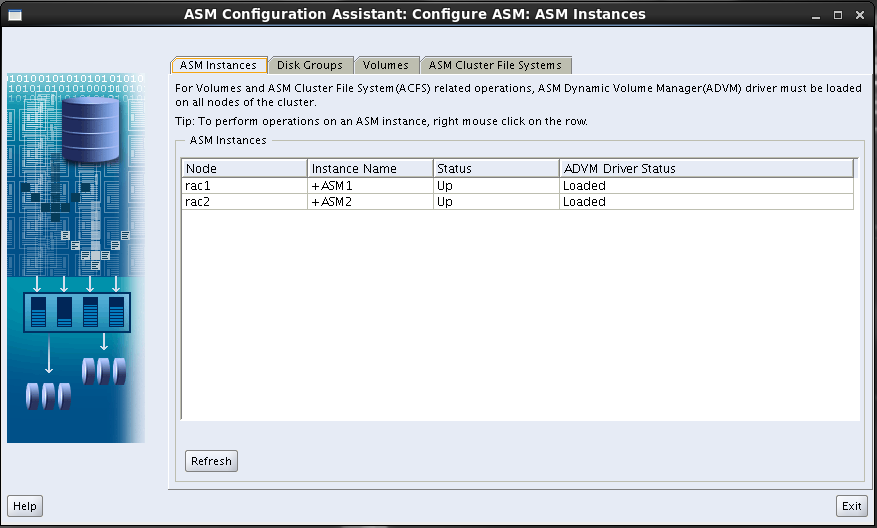
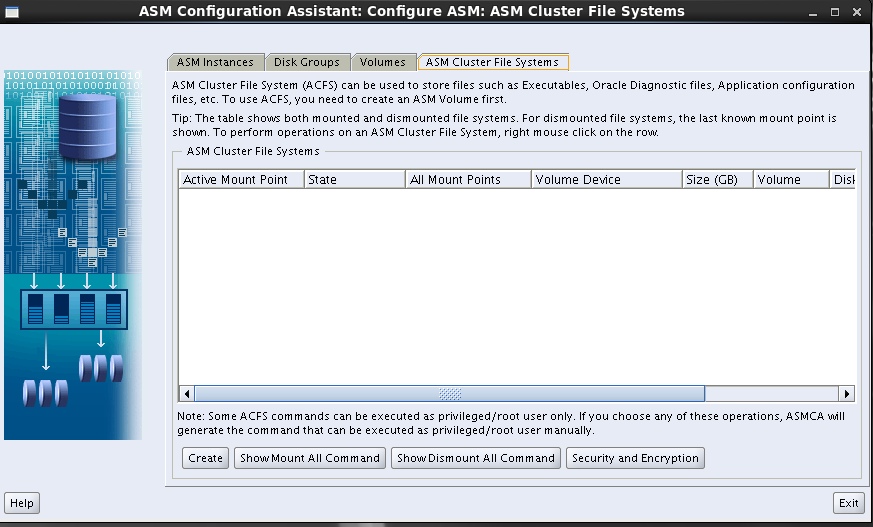
Adding disk group to ASM instance using ASMCA
Here is the step by step process on how to add diskgroup to existing ASM instance via ASMCA.
on cmd prompt set the ASM insatance and then invoke asmca. by using below cmd.
$ asmca


Column level triggers - Oracle
In this case I have requirement where I need to update account_status column in same table with user status. When ever user deleted flag is 0
Lets create a table:
Create table users users (username varchar2(20)),fullname varchar2(30),account_status varchar2(10) default OPEN,deleted number(1), LOCK_DATE date);
Now insert some values:
insert into users values('ARVIND111','ARVIND KUMAR','',,''SYSDATE);
insert into users values('RAGHU111','RAGHU RAM','','',SYSDATE);
insert into users values('RAJ111','RAJ KUMAR','',''SYSDATE);
insert into users values('HARI111','HARI KRISHNA','',''SYSDATE);
Lets say you want to update a column with the account status 'OPEN' or 'LOCKED'. when ever we have a update in another column.
Sample :
In the below case, when ever we update deleted 0, we will update another column saying the account_status is open. If deleted =1, then the account_status is locked.
Lets create trigger now :
create or replace TRIGGER USER_LOCKDATE
BEFORE UPDATE OF DELETED ON users
FOR EACH ROW
BEGIN
IF (:NEW.DELETED=0)
then
:NEW.ACCOUNT_STATUS := 'OPEN';
ELSE
:NEW.ACCOUNT_STATUS := 'LOCKED';
:new.LOCK_DATE := SYSDATE;
end if;
END;
Note:
Enable trigger by using. ( Alter trigger USER_LOCKDATE enable; )
Disable trigger by using. ( Alter trigger USER_LOCKDATE disable; )
Now with above trigger, when you update deleted column, it will update the account_status and lock_date.
Lets create a table:
Create table users users (username varchar2(20)),fullname varchar2(30),account_status varchar2(10) default OPEN,deleted number(1), LOCK_DATE date);
Now insert some values:
insert into users values('ARVIND111','ARVIND KUMAR','',,''SYSDATE);
insert into users values('RAGHU111','RAGHU RAM','','',SYSDATE);
insert into users values('RAJ111','RAJ KUMAR','',''SYSDATE);
insert into users values('HARI111','HARI KRISHNA','',''SYSDATE);
Lets say you want to update a column with the account status 'OPEN' or 'LOCKED'. when ever we have a update in another column.
Sample :
In the below case, when ever we update deleted 0, we will update another column saying the account_status is open. If deleted =1, then the account_status is locked.
Lets create trigger now :
create or replace TRIGGER USER_LOCKDATE
BEFORE UPDATE OF DELETED ON users
FOR EACH ROW
BEGIN
IF (:NEW.DELETED=0)
then
:NEW.ACCOUNT_STATUS := 'OPEN';
ELSE
:NEW.ACCOUNT_STATUS := 'LOCKED';
:new.LOCK_DATE := SYSDATE;
end if;
END;
Note:
Enable trigger by using. ( Alter trigger USER_LOCKDATE enable; )
Disable trigger by using. ( Alter trigger USER_LOCKDATE disable; )
Now with above trigger, when you update deleted column, it will update the account_status and lock_date.
COUNT ROWS FROM ALL TABLES AND PRINT THEM - plsql - oracle
Count rows in all tables or similar tables in database:
I have come across many situations as a DBA when I have to count the total number of rows in a tables in a table across the database. I have written this simple code to help us with that.
If you are a DBA you might also say why not just query the num_rows from all_tables or user_tables. But that is not possible as it might not give you the accurate count, as we all know that you cant get the right numbers with all_tables column, at least not until you have gather the stats for all these tables before you run the query.
----- COUNT ROWS FROM ALL TABLES AND PRINT THEM :
DECLARE
result sys_refcursor;
strTableOwner VARCHAR2(100);
strTableName1 VARCHAR2(100);
strQuery VARCHAR2(4000);
rec NUMBER;
BEGIN
OPEN result FOR SELECT owner,table_name FROM all_tables WHERE table_name IN (
'ABC') order by owner; -->> you can alter this query as per your requirement
LOOP
FETCH
result
INTO
strTableOwner,
strTableName1;
EXIT
WHEN result%notfound;
--- List schema and table being counted
DBMS_OUTPUT.PUT_LINE('count for '||strTableOwner||'.'||strTableName1||' ');
strQuery := 'select count(*) from '||strTableOwner||'.'||strTableName1||' ';
EXECUTE immediate strQuery INTO rec;
DBMS_OUTPUT.PUT_LINE(' >> '||rec||'');
END LOOP;
CLOSE result;
END;
Sample Output :
count for ATOORPU.ABC IS
>> 5
count for SCOTT.ABC IS
>> 1
count for SYS.ABC IS
>> 8
Note :
1) You can edit this plsql as per your requirement, it can count all tables in a schema if change all_tables to user_tables.
2) You can also get the count of different tables by changing the In clause in the cursor.
How To Change the Listener Log Filename Without Stopping the Listener
At the LSNRCTL prompt:
$ lsnrctl
LSNRCTL> set current_listener LISTENER
Current Listener is LISTENER
LSNRCTL> set log_file /u01/app/oracle/diag/tnslsnr/linux01/listener/trace/listener1.log
Connecting to (DESCRIPTION=(ADDRESS=(PROTOCOL=TCP)(HOST=linux01)(PORT=1521)))
LISTENER parameter "log_file" set to /u01/app/oracle/diag/tnslsnr/linux01/listener/trace/listener1.log
The command completed successfully
LSNRCTL> save_config
Connecting to (DESCRIPTION=(ADDRESS=(PROTOCOL=TCP)(HOST=linux01)(PORT=1521)))
Saved LISTENER configuration parameters.
Listener Parameter File /u01/app/oracle/product/11.2/db_1/network/admin/listener.ora
Old Parameter File /u01/app/oracle/product/11.2/db_1/network/admin/listener.bak
The command completed successfully
LSNRCTL> exit
Note : If you get this error "TNS-01251: Cannot set trace/log directory under ADR" refer to below link
click on this >> TNS-01251
$ lsnrctl
LSNRCTL> set current_listener LISTENER
Current Listener is LISTENER
LSNRCTL> set log_file /u01/app/oracle/diag/tnslsnr/linux01/listener/trace/listener1.log
Connecting to (DESCRIPTION=(ADDRESS=(PROTOCOL=TCP)(HOST=linux01)(PORT=1521)))
LISTENER parameter "log_file" set to /u01/app/oracle/diag/tnslsnr/linux01/listener/trace/listener1.log
The command completed successfully
LSNRCTL> save_config
Connecting to (DESCRIPTION=(ADDRESS=(PROTOCOL=TCP)(HOST=linux01)(PORT=1521)))
Saved LISTENER configuration parameters.
Listener Parameter File /u01/app/oracle/product/11.2/db_1/network/admin/listener.ora
Old Parameter File /u01/app/oracle/product/11.2/db_1/network/admin/listener.bak
The command completed successfully
LSNRCTL> exit
Note : If you get this error "TNS-01251: Cannot set trace/log directory under ADR" refer to below link
click on this >> TNS-01251
TNS-01251: Cannot set trace/log directory under ADR
[oracle@linux01 trace]$ lsnrctl
LSNRCTL for Linux: Version 11.2.0.1.0 - Production on 16-SEP-2015 11:24:18
Copyright (c) 1991, 2009, Oracle. All rights reserved.
Welcome to LSNRCTL, type "help" for information.
LSNRCTL> set current_listener LISTENER
Current Listener is LISTENER
LSNRCTL> set log_file listener1
Connecting to (DESCRIPTION=(ADDRESS=(PROTOCOL=TCP)(HOST=linux01)(PORT=1521)))
TNS-01251: Cannot set trace/log directory under ADR
Solution :
DIAG_ADR_ENABLED_LISTENER=OFF -- >> add this line to you listener.ora
reload the listener.
$ lsnrctl reload
Now lets try again to reset:
LSNRCTL> set current_listener LISTENER
Current Listener is LISTENER
LSNRCTL> set log_file /u01/app/oracle/diag/tnslsnr/linux01/listener/trace/listener1.log
Connecting to (DESCRIPTION=(ADDRESS=(PROTOCOL=TCP)(HOST=linux01)(PORT=1521)))
LISTENER parameter "log_file" set to /u01/app/oracle/diag/tnslsnr/linux01/listener/trace/listener1.log
The command completed successfully
LSNRCTL> save_config
Connecting to (DESCRIPTION=(ADDRESS=(PROTOCOL=TCP)(HOST=linux01)(PORT=1521)))
Saved LISTENER configuration parameters.
Listener Parameter File /u01/app/oracle/product/11.2/db_1/network/admin/listener.ora
Old Parameter File /u01/app/oracle/product/11.2/db_1/network/admin/listener.bak
The command completed successfully
Tuesday, September 15, 2015
information provided for listener is currently in use by another software - Virtualbox
I know this is a common problem that I have come across many time, while installing oracle software on Virtual machine >> Linux (Guest OS). I thought of sharing this info as this might help others to ..
Problem / Error :
I was trying to install oracle software on virtual box. I keep getting this error information provided for listener is currently in use by another software.
(or)
Port you have provided xxxx (1523) is being used by another program.


Step 1 : Make sure you login as Root user.
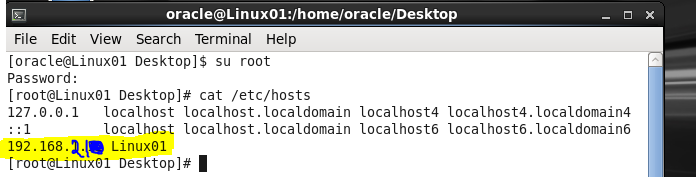
Step 2 : make sure your valid ip address in >> /etc/hosts
Step 3 : Make sure no other program is using listener port >> netstat -ntap | grep 1521
In my case initially it had wrong ip address in the /etc/hosts file.
PLSQL code to audit all (similar) tables in schema - oracle
I was playing around with some plsql code today.Just posting this sample plsql code as I thought this can help people.
This is a sample code that will search for all tables with name ABC,ABC1,ACB2 in all schema's in database and execute a NOAUDIT against these tables. This sql can be modified to accommodate any changes where you want to run a query against all tables & schema's.
sample code:
declare
result sys_refcursor;
V_OWNER Varchar2(100):='SCHEMA_NAME'; --- update this with schema you want to audit.
strTableOwner Varchar2(100);
strTableName Varchar2(100);
strQuery varchar2(300);
begin
open result for
select owner,table_name from user_tables where
table_name in ('ABC','ABC1',ABC2') and owner = 'V_OWNER' order by table_name;
loop
fetch result into strTableOwner,strTableName;
exit when result%notfound;
DBMS_OUTPUT.PUT('NOAUDIT DELETE,UPDATE on '||strTableOwner||'.'||strTableName1||';');
strQuery := 'NOAUDIT DELETE,UPDATE on '||strTableOwner||'.'||strTableName1||' ';
execute immediate strQuery;
DBMS_OUTPUT.PUT_LINE(' ');
DBMS_OUTPUT.PUT_LINE('SUCCESFULL');
end loop;
close result;
end;
/
Note : you can edit this part to what ever you want. >>>> NOAUDIT DELETE,UPDATE on
Subscribe to:
Posts
(
Atom
)